
Download SEMrush – SEO, Keyword Research & Competitive Analysis Tool
Overview – Why SEMrush Stands Out in the SEO Landscape
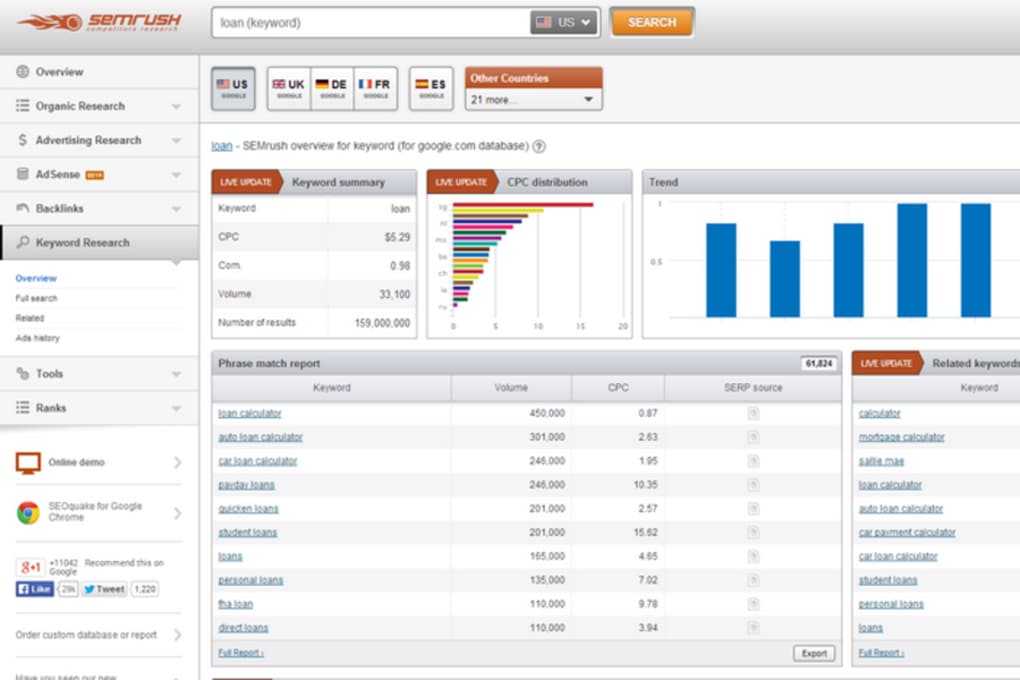
SEMrush has earned its reputation as a premium, data‑driven platform that empowers marketers, webmasters, and SEO specialists to dominate search‑engine rankings and boost paid‑traffic performance. Unlike free alternatives that offer only surface‑level metrics, SEMrush aggregates billions of data points from Google, Bing, YouTube, and major social networks, delivering a comprehensive view of organic visibility, PPC spend, backlink health, and content effectiveness. The dashboard’s vibrant charts translate complex analytics into actionable insights, allowing users to spot trends, benchmark against competitors, and uncover untapped keyword opportunities within minutes.
While the tool’s price tag reflects its depth, the return on investment is measurable: higher click‑through rates, reduced cost‑per‑click, and a clearer roadmap for content strategy. Whether you’re a solo blogger aiming for the first page of Google or a large agency managing dozens of client domains, SEMrush scales to meet those demands. Its blend of technical SEO audits, position tracking, and social‑media reporting creates a single source of truth, reducing the need to juggle multiple subscriptions.
In short, SEMrush is the Swiss‑army knife of digital marketing—robust, secure, and continuously updated to reflect the ever‑changing algorithms that govern online visibility.
Core Capabilities – Feature List That Drives Real Results
- Keyword Magic Tool: Access over 200 million keywords, filter by intent, difficulty, and SERP features, and generate long‑tail clusters for content planning.
- Domain Overview & Competitive Gap: Compare organic and paid performance against up to five competitors, revealing hidden opportunities and threats.
- Technical SEO Audit: Automated site crawl that flags crawl errors, broken links, duplicate content, and schema markup issues with prioritized recommendations.
- Position Tracking: Daily rank monitoring for selected keywords across Google’s regional domains, complete with visibility score and traffic estimates.
- Backlink Analytics & Audit: Visualize backlink profiles, discover toxic links, and generate disavow files to protect domain authority.
- Content Analyzer: Score existing pages on readability, SEO best practices, and topical relevance, while receiving suggestions for improvement.
- Social Media Toolkit: Schedule posts, track engagement metrics, and benchmark performance across major platforms such as Facebook, Twitter, and Instagram.
- PPC Keyword Planner: Build cost‑effective ad groups with CPC forecasts, ad copy suggestions, and competitive ad spend insights.
- Market Explorer: Identify emerging market trends, audience demographics, and potential partnership opportunities using traffic and interest data.
- Custom Reports & White‑Labeling: Generate PDF or CSV reports with branding options, perfect for agency client delivery.
Getting Started – Installation, Usage & Compatibility Details
Installation & Account Setup
SEMrush is a cloud‑based SaaS platform, so there is no traditional software download required for Windows, macOS, or Linux. Users simply create an account at semrush.com, select a subscription tier, and log in through any modern browser. For teams that prefer a desktop‑like experience, SEMrush offers native Windows and macOS apps that sync with the cloud, allowing offline data export and faster navigation. The first‑time login prompts you to set up a Project for each domain you wish to monitor. During project creation you’ll configure Site Audit, Position Tracking, and Social Media settings—all of which can be tweaked later from the dashboard.
How to Use Core Modules Effectively
Begin with the Domain Overview to get a high‑level snapshot of organic traffic, paid search spend, and backlink health. From there, dive into the Keyword Magic Tool to build a seed list of target phrases. Apply filters such as “question” or “commercial” intent to align keywords with your content goals.
Next, launch a Technical SEO Audit to identify crawl issues; the tool will automatically prioritize fixes based on impact. Use Position Tracking to set up daily rank alerts for your chosen keywords, and monitor fluctuations after any on‑page changes. For backlink management, the Backlink Audit visualizes toxic links and suggests a disavow file that can be uploaded directly to Google Search Console.
Finally, explore the Content Analyzer to refine existing copy and generate topic ideas that match user intent.
SEMrush runs on any device with an up‑to‑date web browser (Chrome, Edge, Firefox, Safari) and is also available as native apps for Windows 10/11 and macOS 10.15+. Mobile apps for iOS and Android let you monitor rankings, review alerts, and check social metrics while on the go.
Strengths and Weaknesses – Balanced Pros & Cons Overview
Pros
- All‑in‑one platform that covers SEO, PPC, content, and social media.
- Extensive keyword database with advanced filtering options.
- Accurate competitive intelligence and domain gap analysis.
- Robust technical audit engine that prioritizes fixes.
- Intuitive visual dashboards that simplify complex data.
- Regular updates and new features keep the tool future‑proof.
- Strong API access for custom integrations and reporting.
- Dedicated support, extensive knowledge base, and active community.
Cons
- Higher price point compared with niche or free SEO tools.
- Learning curve for beginners due to the sheer volume of features.
- Some data (especially paid‑search estimates) may lag by a few days.
- Limited offline functionality; core features require internet access.
- Interface can feel crowded when many projects are active simultaneously.
Conclusion, FAQ & Call to Action
Overall, SEMrush lives up to its reputation as a powerhouse for anyone serious about dominating search rankings and optimizing paid campaigns. Its breadth of data, combined with a user‑friendly interface, makes it a worthy investment for agencies, e‑commerce sites, and growth‑focused enterprises. While the subscription cost is premium, the potential lift in organic traffic, reduced ad spend, and deeper competitive insights often offset the expense within a few months of active use. If you’re ready to transform raw data into a strategic advantage, start your free 7‑day trial today, explore the full feature set, and see how SEMrush can accelerate your digital growth.
Frequently Asked Questions
Is there a free version of SEMrush?
SEMrush offers a limited free tier that provides a handful of daily reports, but the full suite of features—keyword research, site audit, and competitive analysis—requires a paid subscription or a 7‑day trial.
Can I cancel my subscription at any time?
Yes. SEMrush follows a month‑to‑month billing model, and you can cancel through your account settings without incurring additional fees.
How often is the keyword database updated?
The keyword database is refreshed weekly, ensuring that search volume, CPC, and competition metrics reflect the latest search engine trends.
Does SEMrush support multiple users for agencies?
Agency plans include multi‑user seats, role‑based permissions, and white‑label reporting, making collaboration across teams seamless.
Is my data secure on SEMrush’s cloud platform?
SEMrush adheres to industry‑standard encryption, regular security audits, and GDPR compliance to protect user data.
Start your free trial of SEMrush now and unlock the insights that power the world’s leading digital marketers.



.png)



